
How to Move and Copy Objects Between S3 Buckets
Learn how to efficiently move and copy files between different S3 buckets with simple right-click actions.
Managing files across multiple S3 buckets is a common need for organizations with complex storage strategies. Whether you're reorganizing data, implementing lifecycle policies, or moving files between different environments, SandCrab makes cross-bucket operations as simple as drag-and-drop or a right-click.
Understanding Cross-Bucket Operations
Amazon S3 treats each bucket as a separate namespace, and moving or copying objects between buckets involves specific API operations and permission considerations. Unlike moving files within the same bucket (which is essentially a copy-and-delete operation), cross-bucket transfers require downloading from the source and uploading to the destination.
Key Concepts
- Copy Operations: Create a duplicate in the target bucket while preserving the original
- Move Operations: Transfer the object to the target bucket and delete from the source
Moving and Copying Objects with SandCrab
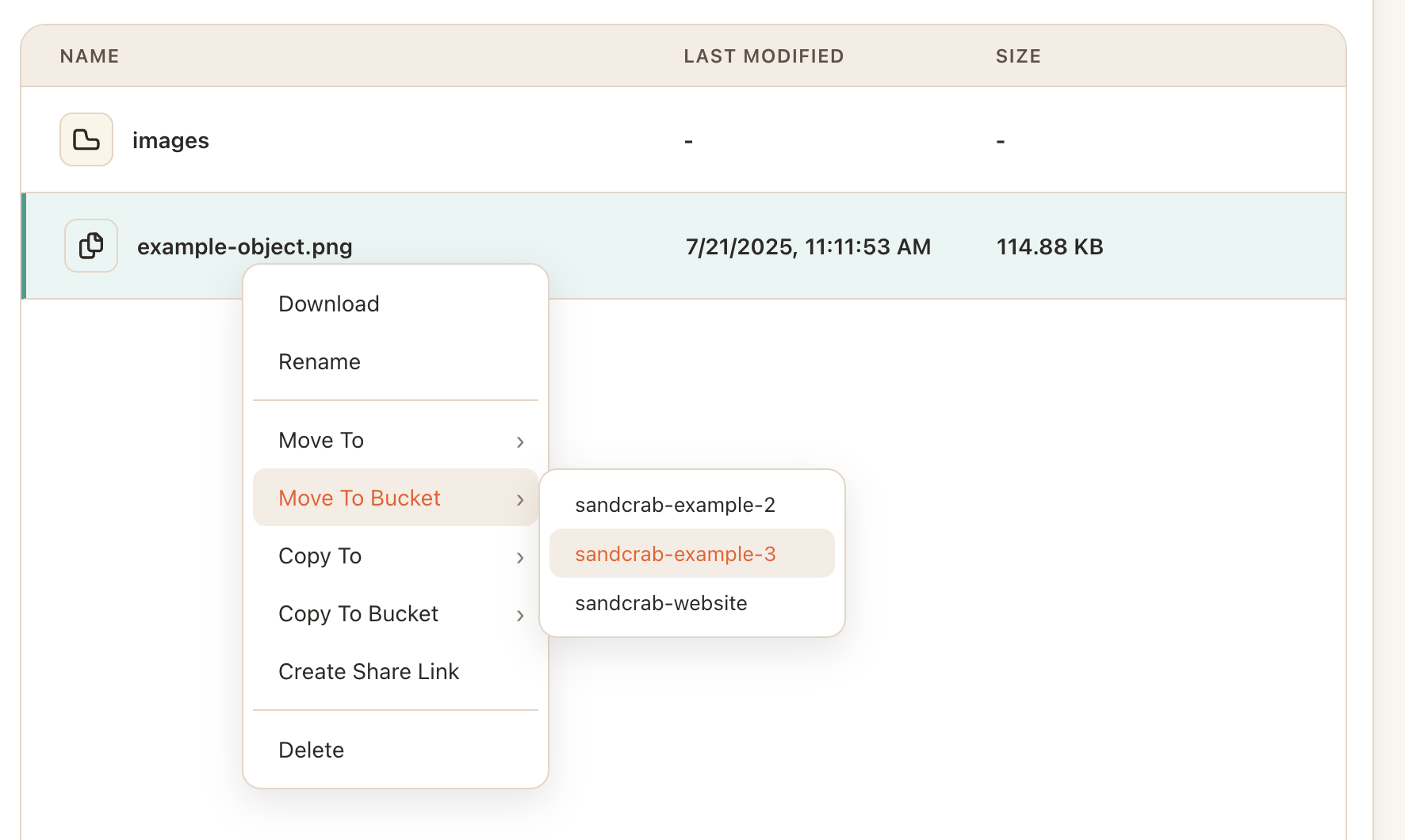
SandCrab streamlines cross-bucket operations with an intuitive interface that handles all the complexity behind the scenes. Here's how to use these powerful features:
Step 1: Select Your Objects
Navigate to the source bucket and select the objects you want to move or copy. You can select multiple objects by holding Command (⌘) while clicking, or use Command+A to select all objects in the current view.
Step 2: Right-Click for Context Menu
Right-click on your selected objects to open the context menu. You'll see options for both "Move To Bucket" and "Copy To Bucket".
Step 3: Choose Your Target Bucket
Select either "Move To Bucket" or "Copy To Bucket" from the context menu. SandCrab will present a dropdown list of all available buckets in your current AWS profile, making it easy to choose your destination.
Step 4: Confirm and Monitor Progress
After selecting your target bucket, SandCrab will begin the transfer operation. You can monitor the progress through the built-in progress indicators, which show both individual file progress and overall batch completion.
How It Works Under the Hood
When you perform cross-bucket operations in SandCrab, several AWS API calls happen behind the scenes to ensure efficient and reliable transfers:
Copy Operations
For copy operations, SandCrab uses the AWS S3 `CopyObject` API when possible. This server-side copy operation is much faster than downloading and re-uploading, especially for large files:
// Simplified example of the copy operation
const copyParams = {
  Bucket: targetBucket,
  CopySource: `${sourceBucket}/${objectKey}`,
  Key: objectKey,
  MetadataDirective: 'COPY'
};

await s3.copyObject(copyParams).promise();
Move Operations
Move operations combine a copy with a delete. SandCrab first copies the object to the target bucket, then deletes it from the source bucket only after confirming the copy was successful:
// 1. Copy to destination
await s3.copyObject(copyParams).promise();

// 2. Verify the copy succeeded
const headResult = await s3.headObject({
  Bucket: targetBucket,
  Key: objectKey
}).promise();

// 3. Delete from source only if copy verified
if (headResult) {
  await s3.deleteObject({
    Bucket: sourceBucket,
    Key: objectKey
  }).promise();
}
Batch Operations and Optimization
SandCrab optimizes bulk transfers by:
- Parallel Processing: Multiple objects are transferred simultaneously
- Smart Retry Logic: Failed transfers are automatically retried with exponential backoff
- Bandwidth Management: Transfer speeds are optimized to not overwhelm your connection
- Progress Tracking: Real-time updates on transfer status for each object
Permission Requirements
Cross-bucket operations require specific IAM permissions on both the source and target buckets:
Required Permissions
- Source Bucket:
s3:GetObjectands3:DeleteObject(for moves) - Target Bucket:
s3:PutObjectands3:PutObjectAcl - Both Buckets:
s3:ListBucketfor navigation
Cross-Account Considerations
If your buckets are in different AWS accounts, additional bucket policies may be required to allow cross-account access. SandCrab will display clear error messages if permission issues are encountered.
Best Practices for Cross-Bucket Operations
Plan Your Bucket Strategy
Before moving large amounts of data, consider your bucket organization strategy. Group related data together and use consistent naming conventions across buckets.
Monitor Costs
Cross-region transfers incur data transfer costs. Use SandCrab's batch operations to minimize the number of API calls and optimize transfer efficiency.
Preserve Metadata
SandCrab automatically preserves object metadata during transfers, including custom metadata, content types, and cache control headers. This ensures your objects maintain their properties in the new location.
Test with Small Batches
When moving large amounts of data, start with a small test batch to verify permissions and transfer behavior before processing entire directories.
Troubleshooting Common Issues
Permission Errors
If you encounter permission errors, verify that your AWS profile has the necessary permissions for both source and target buckets.
Storage Class Considerations
Objects copied to buckets with different default storage classes will inherit the target bucket's storage class unless explicitly specified.
Conclusion
SandCrab transforms complex cross-bucket operations into simple right-click actions, while maintaining the robustness and reliability required for enterprise workflows. By understanding both the intuitive interface and the powerful AWS operations happening behind the scenes, you can confidently manage your S3 data across any number of buckets.
Whether you're organizing data, implementing backup strategies, or managing multi-environment deployments, SandCrab's cross-bucket capabilities provide the tools you need with the simplicity you want.